A switch on your phone, a relay on your device: tap, and it clicks — from the sofa, or from the other side of the world. This page wires a switch to a relay in three steps, with the complete sketch, and explains the one rule that makes every control work the same way.
How it works
A control — a button, a switch, a slider — writes to a signal when you touch it. Your device watches that signal’s address with a block: a few lines that run every time a value arrives. ISwitch(I0, bool on) runs with on true or false. ISimpleButton(I0) runs WHEN_PRESSED and WHEN_RELEASED. The block is the whole contract; what happens inside is yours.
The address is all the device knows. Swap the switch for a button, or for a rule that flips the signal at 7 pm — the sketch does not change.
Before you start. Make the relay (or LED, or motor) work from a plain sketch first:
digitalWrite(RELAY, HIGH)insetup(). If it does nothing there, the app will not help.
1. Declare the signal
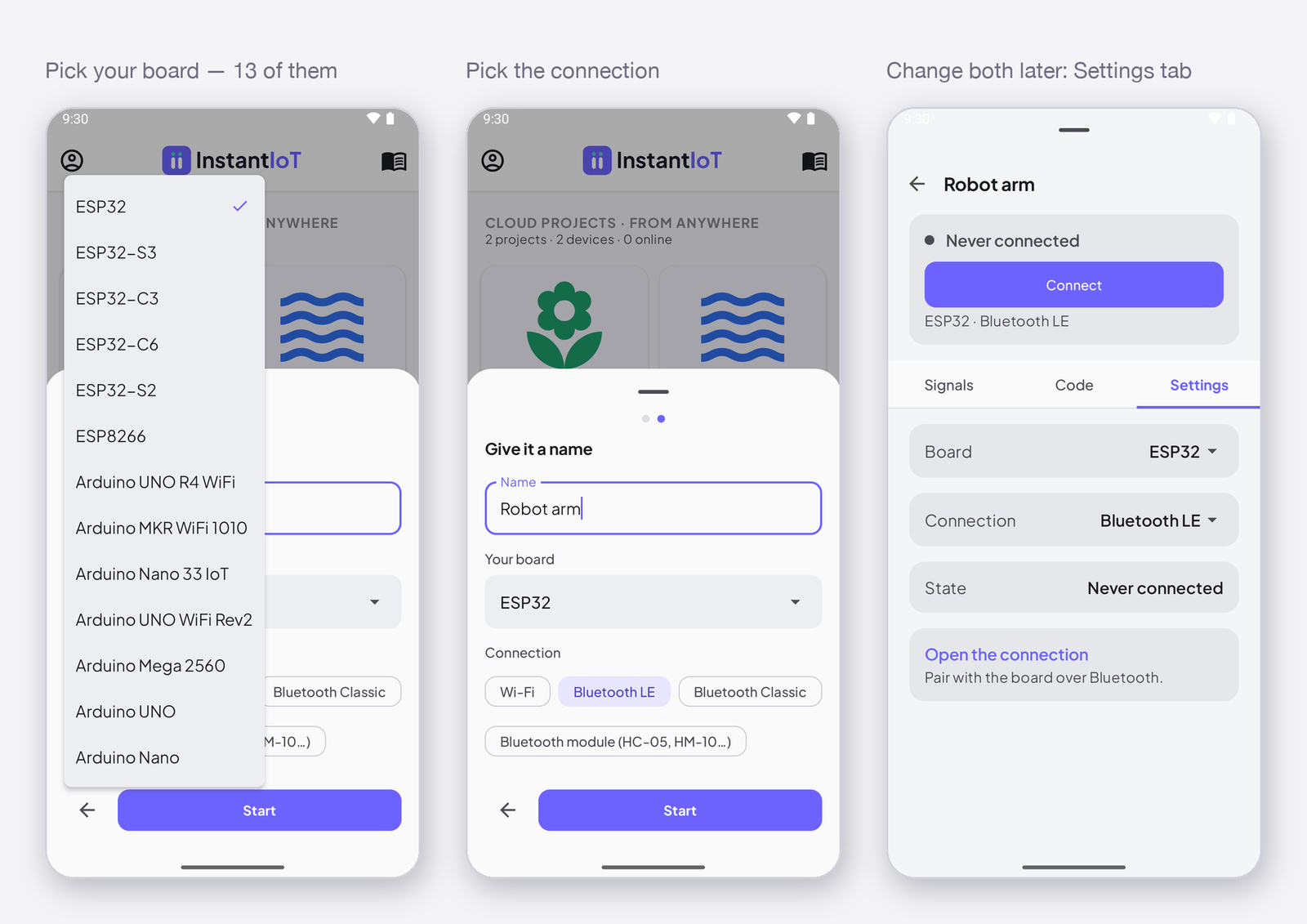
Tap the device icon at the top right, then Declare a signal. Name it LED, keep the type Integer. The app gives it I0 — the built-in LED is the relay of this page; a real relay is the same wire on another pin.
2. Put a control on it
Tap + at the bottom and choose Switch under Controllers. Tap the switch, open its Data tab, tap + Add a target and pick LED. On sends 1, Off sends 0 — you can change both. Close the settings and tap ▶ to switch to Run mode.
3. React on the device
ISwitch(I0, bool on) {
    digitalWrite(LED, on);
};
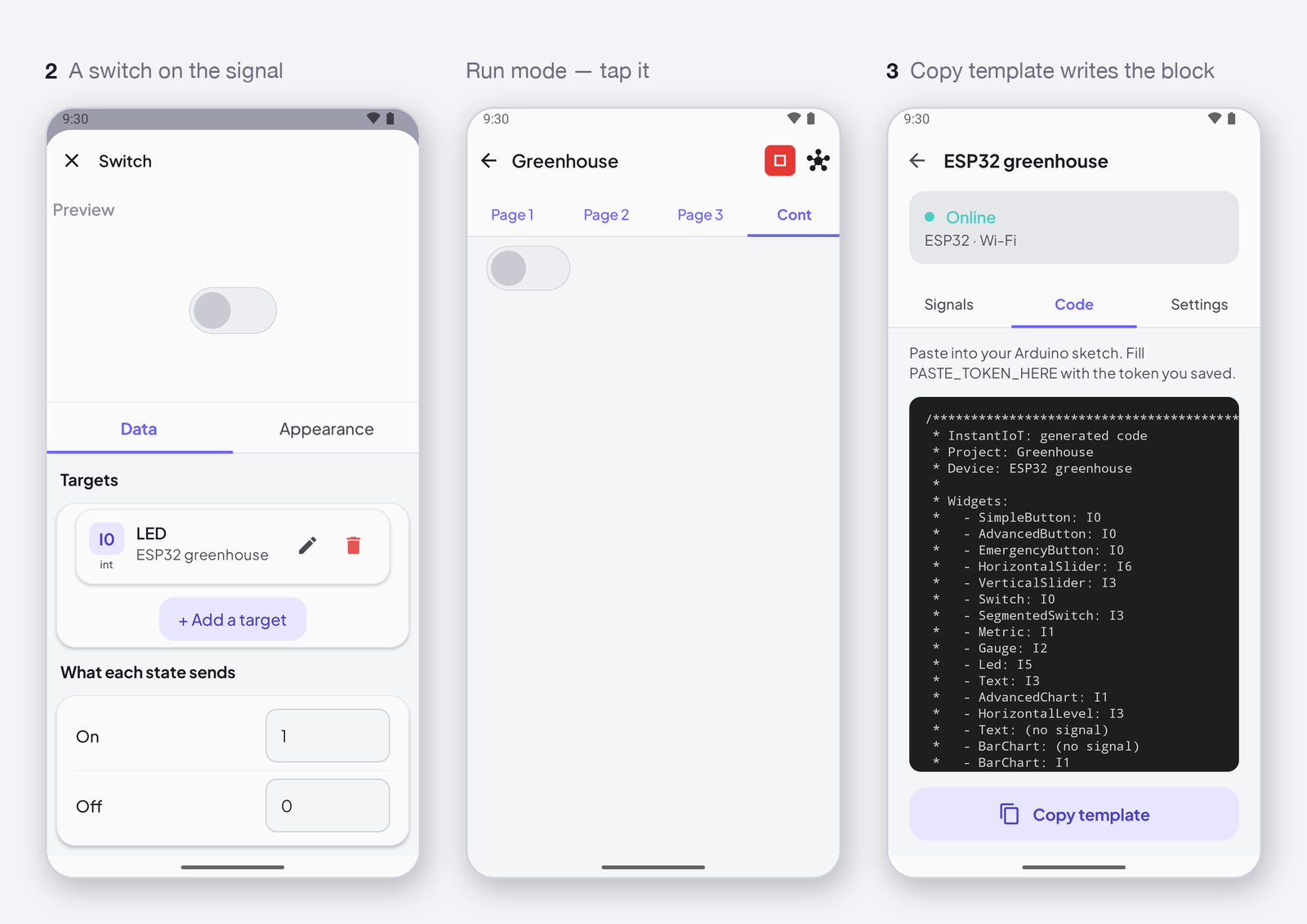
The complete sketch — and Copy template in the device’s Code tab writes it for you, with every control of your dashboard already in it:
#include <InstantIoT.h>

const char* WIFI_SSID    = "MyWiFi";
const char* WIFI_PASS    = "MyPassword";
const char* DEVICE_TOKEN = "PASTE_TOKEN_HERE";

const int LED = 2;   // the ESP32 built-in LED — a relay is the same, on another pin

ISwitch(I0, bool on) {
    digitalWrite(LED, on);
};

void setup() {
    pinMode(LED, OUTPUT);
    InstantIoT.begin(WiFiLink(WIFI_SSID, WIFI_PASS), Cloud(DEVICE_TOKEN));
}

void loop() {
    InstantIoT.loop();
}
Nothing in
loop(). The block runs by itself when a value arrives;InstantIoT.loop()is the only thing the loop needs. Put adelay(1000)in there and the switch answers a second late.
Three shapes of block
| You placed | The device writes | It runs |
|---|---|---|
| a switch, a slider, a joystick | ISwitch(I3, bool on), IHorizontalSlider(I1, float v), IJoystick(I2, float x, float y) |
with the value |
| a button, a pad | ISimpleButton(I0) { WHEN_PRESSED … WHEN_RELEASED … } |
per gesture |
| anything | ISignal(I6, float v) — any address, any type |
with the value |
A setpoint survives a reboot
A switch position is a state. With Restore after a restart on the signal, the Cloud sends the last position again the moment the device reconnects — the lamp that was on before the power cut is on again when the device comes back, with nobody’s phone open. A button is a gesture: nobody pressed, so it does not replay. The block that receives a replayed value is ISignal: Receive any value with ISignal, and restore it after a restart.
Where next
- Read a sensor value on your phone — the other direction.
- Receive commands from the app on the device — every block, every
WHEN_clause. - Widgets: Controllers — the nine controls and what each one sends.